
OXYGEN THIEF

Bardzo aktywny
Członek Załogi
Administrator
Dołączył
26 Maj 2010
Posty
49210
Reakcje/Polubienia
35263
Miasto
Trololololo
business.jpg

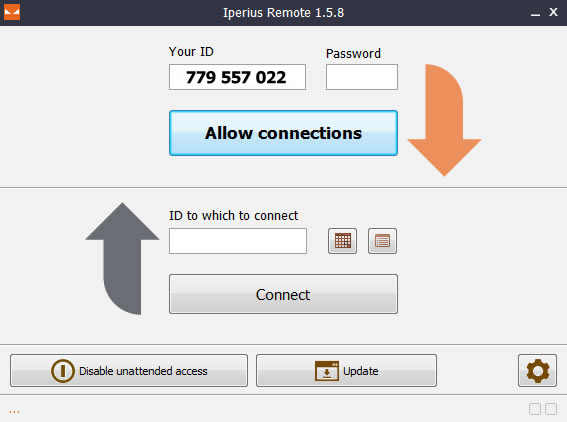
Iperius Remote pozwala na szybkie i łatwe podłączenie się do dowolnego zdalnego podłączonego do internetu komputera.Program pozwala szybko przesyłać pliki lub skorzystać z funkcji czatu. Iperius Remote jest idealny dla zapewnienia zdalnego wsparcia dla swoich klientów lub po prostu aby pomóc komuś rozwiązać problem gdy jesteśmy gdzieś daleko. Nieskomplikowany interfejs sprawia że każdy może być ekspertem zdalnego pulpitu .Program jest bezpłatny.
Zaloguj lub Zarejestruj się aby zobaczyć!
 

Camel1965

Bardzo aktywny
Zasłużony
Dołączył
8 Wrzesień 2010
Posty
56805
Reakcje/Polubienia
41383

Iperius Remote 4.7.6.16​

  • Updated video rendering engine for improved performance and compatibility
  • Introduced "Ultra Quality" mode for high-performance, high-quality LAN connections
  • Option to choose the video codec: H.264, VP9, ??AV1
  • Copy-and-paste text now also available on the remote PC login screen (password can be pasted into the logon window)
  • Moved the full-screen mode button to the main menu
  • Ability to downgrade to the official version after leaving the Beta channel
  • Improved screen capture and H.264 codec for smoother operation
  • Enhanced keyboard handling, including for mobile devices
  • Improved connection and program stability in receive mode
  • Optimized monitor switching procedure (Windows and macOS)
  • More stable and faster file transfer, which resolves some issues with Macs
  • Extended compatibility with Windows 7 and older systems
  • Fixed an issue that In some cases, automatic reconnection was prevented.
  • Fixed an issue that prevented remote printing from working in some cases.
  • Some special mouse cursors (including Excel cursors) are now displayed correctly.
  • Fixed a bug when elevating from user to administrator remotely.
  • Further improved overall stability and performance.
  • Some minor bug fixes.
Zaloguj lub Zarejestruj się aby zobaczyć!
 

Camel1965

Bardzo aktywny
Zasłużony
Dołączył
8 Wrzesień 2010
Posty
56805
Reakcje/Polubienia
41383

Iperius Remote 4.7.7.4​

  • File transfer is now even faster.
  • Various improvements and optimizations to video quality and smoothness.
  • File transfer limit increased to 2 GB for PRO versions (in non-peer connections; otherwise, there are no limits)
  • Added ability to save the size of the remote control window.
  • The File Browser would sometimes not update the file list with sent or deleted files.
  • Fixed an issue that could prevent elevation to administrator status.
  • Fixed an issue that could prevent transferring files larger than 500 MB.
  • Added an option to bypass the need to confirm closing the remote control window.
  • Fixed an issue with the activation and display of some buttons in the custom client.
  • Fixed an issue that could prevent chat from starting.
Zaloguj lub Zarejestruj się aby zobaczyć!
 

Ircus

Bardzo aktywny
Ekspert
Dołączył
26 Maj 2010
Posty
22989
Reakcje/Polubienia
70822

Iperius Remote 4.8.1.0​

Iperius Remote 4.8.1 - Windows​

22/09/2026

  • Added Greek translation
  • Added Polish translation
  • Improved performance and responsiveness in various scenarios
  • Fixed an issue in the graphical interface of the custom/quick support version (rebranding)
  • Fixed some application freezing issues
  • Fixed an issue that in some cases could cause a "5 - Access denied" error message to appear when starting the application
  • Fixed an access error to the administration area when it was opened by clicking the related button in the application
  • Greater accuracy in mouse movement, especially in case of resolution differences between the local and remote device
  • Fixed an issue that in some cases could cause a delay in the graphical update of the mouse pointer
  • Fixed an issue with a negative license check when editing the account without changing the password
Zaloguj lub Zarejestruj się aby zobaczyć!
 

Ircus

Bardzo aktywny
Ekspert
Dołączył
26 Maj 2010
Posty
22989
Reakcje/Polubienia
70822

Iperius Remote 4.8.3.0​

Iperius Remote 4.8.3 - Windows​

26/10/2026

  • Now, when reversing a connection, control can be resumed via a button next to the connected device information in the main program window.
  • Now, elevation with administrator credentials without UAC prompt confirmation can also be done when the Guest user is connected to the remote PC.
  • In the remote control window, operators now see the outcome of privilege elevation, including the reason for any error: incorrect credentials, non-admin user, denied confirmation, or other issues.
  • Fixed an issue where Iperius could give a false positive when checking for open instances in other sessions.
  • On Windows 7, Windows 8, and Windows Server 2012 R2, elevation to administrator now works correctly.
  • Full support for keyboards with different layouts between operator and remote PC (e.g., Italian or English operator and Greek remote PC): letters, numbers, and symbols are typed as intended without needing to align the languages of the two keyboards.
  • Program shutdown is now immediate; previously it took a few seconds.
  • Fixed some compatibility issues with the chat and tray icon on Windows 7 and Windows Server 2012 R2.
  • Fixed high non-paged pool memory usage, which increased during remote control sessions and was only released by restarting Iperius Remote.
  • Fixed an issue that caused excessive system resource usage with each Ctrl+Alt+Del sent to the remote PC.
  • Fixed a possible startup freeze on Windows 7, Windows 8.1, and Windows Server 2012 R2.
  • The "Switching monitor" window might not close correctly when switching to another monitor of the remote PC in some cases.
  • Fixed some communication issues between the chat components and tray icon when using Iperius Remote with the Guest user.
  • Increased stability during file transfers.
  • Language change on the remote PC (Alt+Shift or taskbar) is now respected.
  • Characters with AltGr ([, ], € ...) now work even with different layouts.
  • Privilege elevation with credentials: the UAC prompt no longer appears on unattended remote PCs with Windows 11 24H2.
  • Fixed an error that, after a failed connection attempt, prevented subsequent connections and clipboard sharing until the program was restarted.
  • Fixed an issue that in some cases could leave the Shift, Ctrl, and Alt keys stuck on the remote PC.
  • Keys that do not produce characters (such as the Menu key) are now correctly transmitted to the remote PC.
  • Fixed an issue that in some cases could slow down the mouse during program shutdown.
  • With the 32-bit version on 64-bit Windows, the Iperius Remote ID now correctly matches the one assigned by Iperius ONE.
  • The version shown in the list of installed programs in the Windows Control Panel now updates even after an automatic update.
Zaloguj lub Zarejestruj się aby zobaczyć!
 
Do góry