
al

Forumowiszcze
Członek Załogi
Administrator
Dołączył
22 Lipiec 2012
Posty
13210
Reakcje/Polubienia
13120
Miasto
Somewhere over the rainbow.
ControlMyMonitor jest bezpłatnym programem (portable), które umożliwia przeglądanie i modyfikowanie ustawień monitorów, w tym jasności, kontrastu, ostrości, balansu itp. Współpracuje z każdą wersją systemu Windows, od Windows Vista po Windows 10 z obsługą systemów 32-bitowych i 64-bitowych.
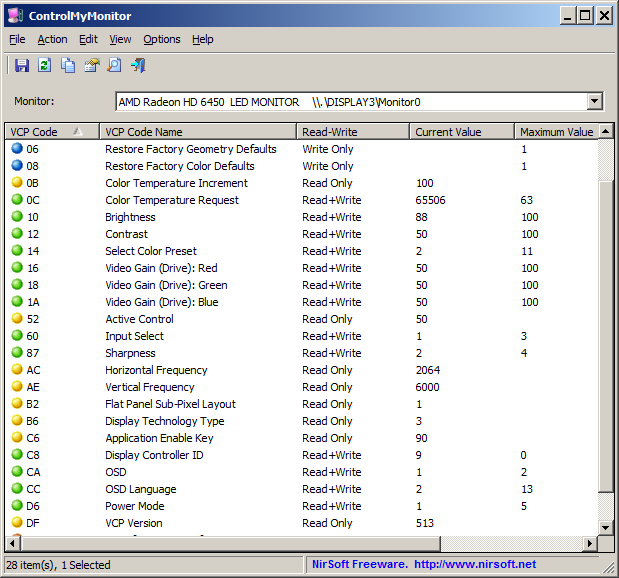
controlmymonitor.png


Pobieramy:

Zaloguj lub Zarejestruj się aby zobaczyć!
 

Grandalf

Bardzo aktywny
Członek Załogi
Moderator
Dołączył
26 Maj 2015
Posty
19243
Reakcje/Polubienia
56077
ControlMyMonitor 1.20
Version 1.20
  • Added /SwitchValue command-line option, which allows you to switch between multiple values.
  • For example, in order to switch the monitor off when it's turned on and switch it on when it's turned off, use the following command: (On some monitors you should use 4 instead of 5)
    ControlMyMonitor.exe /SwitchValue "\\.\DISPLAY1\Monitor0" D6 1 5
Pobieranie:
Zaloguj lub Zarejestruj się aby zobaczyć!
 

Ircus

Bardzo aktywny
Ekspert
Dołączył
26 Maj 2010
Posty
18604
Reakcje/Polubienia
59663
ControlMyMonitor 1.27
•Version 1.27: ◦Added /TurnOff command-line option to turn off the specified monitor.
◦Added /TurnOn command-line option to turn on the specified monitor.
◦Added /SwitchOffOn command-line option to switch the specified monitor between on and off state

Pobieramy na stronie:
Zaloguj lub Zarejestruj się aby zobaczyć!
 

Camel1965

Bardzo aktywny
Zasłużony
Dołączył
8 Wrzesień 2010
Posty
50228
Reakcje/Polubienia
39173
ControlMyMonitor 1.40

Versions History​


  • Version 1.40:
    • Added 'Loading Mode' option. You can choose 3 different modes: Load only VCP codes from list provided by the monitor (The default option), Try to load all VCP codes, Load only the specified VCP codes.
    • Added 'Try to read VCP code again if it fails in the first time' option. If some of the VCP codes are randomly missing when you refresh, you should try to turn on this option.
    • The new options are available in the 'Advanced Options' window (Options -> Advanced Options or simply press F9).
    • Fixed ControlMyMonitor to display the 'Possible Values' column if the monitor provides this information (This feature was accidentally disabled in one of the ControlMyMonitor updates).
  • Version 1.38:
    • Fixed bug: On some monitors, ControlMyMonitor detected the available VCP features incorrectly.
  • Version 1.37:
    • Added 'Short Monitor ID' string for using to identify the monitor from command-line. You can get the 'Short Monitor ID' of your monitorby using the 'Copy Monitor Strings' option (Ctrl+M).
    • Updated to use only the first byte of 'Input Select' (VCP Code 60), as a workaround for some monitors that provide incorrect 'Input Select' value.If from some reason you want to disable this option, simply open ControlMyMonitor.cfg with any text editor, and set the UseOnlyOneByte value to 0
  • Version 1.36:
    • Added 'Start As Hidden' option. When this option and 'Put Icon On Tray' option are turned on, the main window of ControlMyMonitor will be invisible on start.
  • Version 1.35:
    • Added 4 display filter options: Display Read+Write, Display Read Only, Display Write Only, Display Manufacturer Specific.
  • Version 1.31:
    • you can now use 'Secondary' as the monitor string in all command-line options in order to specify the secondary monitor.
  • Version 1.30:
    • When there is a DDC/CI error (Error codes like 0xC0262582, 0xC0262583), the error description is now displayed in the status bar in addition to the error code.
    • You can also click the error code with the mouse in order to copy the error code and error description to the clipboard.
  • Version 1.29:
    • Added option to choose another font (name and size) to display in the main window.
  • Version 1.28:
    • Fixed some display issues in high DPI mode (Toolbar and status bar).
Zaloguj lub Zarejestruj się aby zobaczyć!
 
Do góry