
Fences

Bizon

Bardzo aktywny
Fąfel
Dołączył
6 Lipiec 2010
Posty
2093
Reakcje/Polubienia
325
Miasto
Nagykutas
Kiedy komuś brakuje miejsca na pulpicie albo chce mieć dużo plików bądź skrótów pod ręką to jest przydatny program do tego.
Nazywa się Fences. Występuje w wersji Free jak i Pro.
Dzięki niemu można tworzyć na pulpicie obszary, w których można umieszczać dowolnie dużo ikon.
Wystarczy narysować np. prostokąt o dowolnym rozmiarze, nadać mu nazwę np. Dokumenty i przeciągnąć do niego interesujące nas ikony.
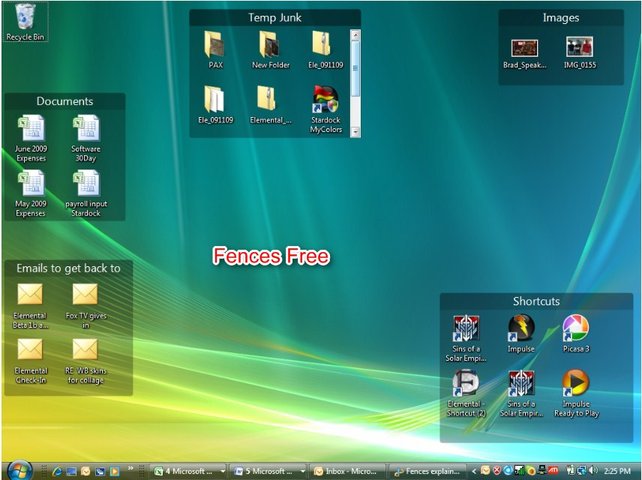
ivgZq.jpg


Prezentacja możliwości --->
Zaloguj lub Zarejestruj się aby zobaczyć!

Strona programu --->
Zaloguj lub Zarejestruj się aby zobaczyć!

Pobieranie --->
Zaloguj lub Zarejestruj się aby zobaczyć!
 

daniel

Bardzo aktywny
Dołączył
2 Czerwiec 2010
Posty
556
Reakcje/Polubienia
4
Pewnie start systemu przy tylu ikonach jest ,,rekordowo krótki'' :D
 

Camel1965

Bardzo aktywny
Zasłużony
Dołączył
8 Wrzesień 2010
Posty
57266
Reakcje/Polubienia
41565

Fences 7.0.0.9​

Changes​

Please see our
Zaloguj lub Zarejestruj się aby zobaczyć!
.

Privacy

  • New major feature, Privacy mode – mask icons, titles and other potentially sensitive desktop content until desktop becomes active.
    • Choose to mask titles, icon images, Fence group titles, or all of the fields.
    • Reveal with mouse-over gesture, when desktop is active, or neither.
Look & Feel

  • Customizable Mica Material
    • A new blending option for Fence groups to match Windows 11 design language, while giving extra control over personalizing your Fence groups on a per-group basis.
  • Theme support
    • Light mode theme that utilizes Micra material to match Windows 11 style
    • Dark mode theme that utilizes Mica material to match Windows 11 style
    • Auto mode will dynamically adjust theme and color based on Windows theme.
  • Corner radius and material strength options
    • New options to tune corner radius and material strength to best suit your needs.
  • Hide cloud sync status indicators on desktop icons
    • Solves a common annoyance for users with OneDrive-synced desktops.
  • Per-element selection for previous version effects (Tint and Chameleon)
    • Choose to apply effects from previous versions (Icon Tint and Chameleon) to specific desktop elements, instead of the full desktop. Select between “all icons and groups”, “groups only”, or “ungrouped icons only".
Desktop power tools

  • Search in Folder Portals™
    • A new search icon in the top right corner of a Folder Portal enables you to turn any Folder Portal into a live search, to find what you need or to provide an always-on live search/filter view. (Requires Windows Search indexing.)
  • Folder Portal enhancements
    • New options for Navigate to Root (reset navigation) upon clicking away, “List” menu-style views, ability to hide shortcut / cloud syncing indicators, and other refinements and improvements.
New interactions

  • Multi-group moving (layout management)
    • Lasso to select and move multiple groups simultaneously, to make rearranging your layout faster and easier.
  • Enhanced “Single Click to Open”
    • Overcomes the limitations of Windows’ existing built-in “Single Click to Open” setting, by allowing users to turn on for the desktop only, and without the underlining and hand cursor that comes with Windows’ own built-in “Single Click to Open” functionality.
And more

  • General
    • Improvements to underlying customization functionality across various settings to improve consistency and ease of use.
    • Performance improvements for interaction with Fence groups on the desktop.
Pobieramy na stronie:
Zaloguj lub Zarejestruj się aby zobaczyć!
 
Do góry