Hasleo Software

jasonX

Bardzo aktywny
Dołączył
23 Październik 2015
Posty
163
Reakcje/Polubienia
1066

twMSydM.png


Hasleo Software (formerly called EasyUEFI Development Team)


Hasleo software (formerly called EasyUEFI Development Team) was established in 2012, all team members have rich experience in software development, and are committed to develop the system tools software. They aim to provide high quality and professional software to their users. Currently, they have accumulated over 15,000,000 wonderful users, covering over 160 countries and regions. We will never stop moving forward.

Hasleo is constantly trying to grow with its dedication to user's satisfaction and its provision of cutting-edge technology. Thus, they will keep improving the functions and performance of products. They believe that with user support, Hasleo will become stronger and stronger. The commitment of Hasleo is providing the best and most convenient programs for users with high tech. The essence of Hasleo's work is to spare no effort to make software more innovative and easy-to-use. Products of Hasleo Software are listed below.

1. Windows To Go

  • WinToUSB
  • Windows To Go Upgrader

2. Data Recovery

  • Hasleo Data Recovery
  • Hasleo BitLocker Data Recover

3. BitLocker Solution

  • BitLocker Anywhere For Windows
  • BitLocker Anywhere For Mac
  • BitLocker Anywhere For Linux
  • Hasleo BitLocker Data Recovery

4. Backup & cloning

  • Backup Suite
  • Disk Clone

5. Utilities

  • EasyUEFI
  • WinToHDD
  • NTFS for Mac


Hot Products

  • Hasleo EasyUEFI
  • Hasleo WinToUSB
  • Hasleo WinToHDD
  • Hasleo Data Recovery
  • Hasleo BitLocker Anywhere
  • Hasleo Backup Suite


Hasleo is devoted to meet every needs all users desire for digital life. If you have questions or suggestions about our products, please feel free to contact us. Your suggestions will be of great importance for us to improve our products.

Support Contact
Any technical problem on our products, please feel free to contact them via e-mail. Email: support@easyuefi.com

Sale Contact
Any problem during the online purchase, please feel free to contact them via e-mail. Email: sales@easyuefi.com


PERTINENT LINKS


Zaloguj lub Zarejestruj się aby zobaczyć!


Zaloguj lub Zarejestruj się aby zobaczyć!


Zaloguj lub Zarejestruj się aby zobaczyć!


Zaloguj lub Zarejestruj się aby zobaczyć!


Zaloguj lub Zarejestruj się aby zobaczyć!


Data and Info derived from Hasleo Software with permission
 

jasonX

Bardzo aktywny
Dołączył
23 Październik 2015
Posty
163
Reakcje/Polubienia
1066
Hasleo Backup Suite


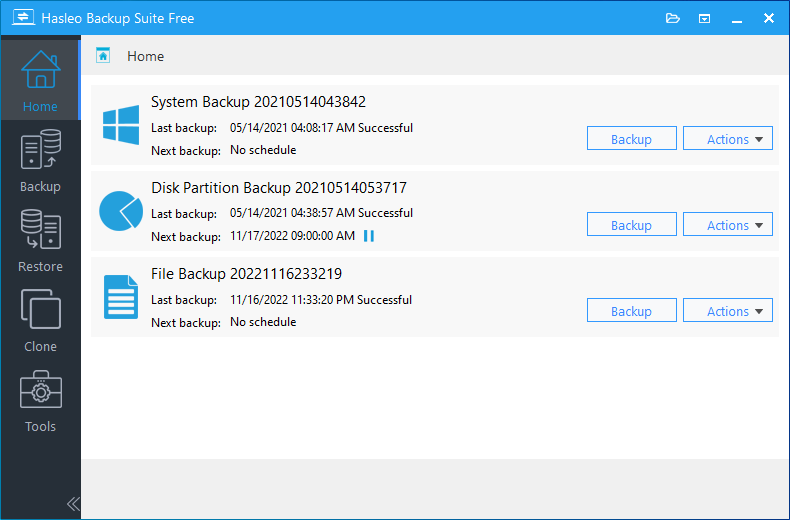
Hasleo Backup Suite is a full comprehensive solution for Windows backup and restore software embedding backup, restore, and cloning features in one application. The software is designed for Windows users and is compatible with both Windows PCs and Servers. Hasleo Backup Suite natively supports Windows X86/X64 and ARM64, enhancing performance while reducing power consumption.


hasleo-backup-suite-main-window.png


Hasleo Backup Suite is the best Windows Backup Software Helps You Protect Windows OS and Data Security! See key features below:

  • IMPROVED Backup, Restore and Clone Windows OS, Disks, Partitions, Files/Folders.
  • Backup Modes: Full, Incremental, Differential.
  • Compress, Encrypt, Split, Merge, Delete, Check and Mount Backup Image Files.
  • NEW - Delta Clone/Restore Improves Clone/Restore Speed by Cloning/Restoring only Changed Blocks.
  • Advanced Backup Options: Filter, Scheduling and Retention Policies.
  • Create Bootable WinPE Emergency Disk and Support Command Line Interface (CLI).
  • Comprehensive Windows File System Compatibility: FAT, NTFS, exFAT, ReFS [(New)
  • Supported OS: Windows Vista/Server 2008 or later Running on X86/X64/ARM64 Processors.


U7qrA5w.jpeg


KEY FEATURES


  • System Backup

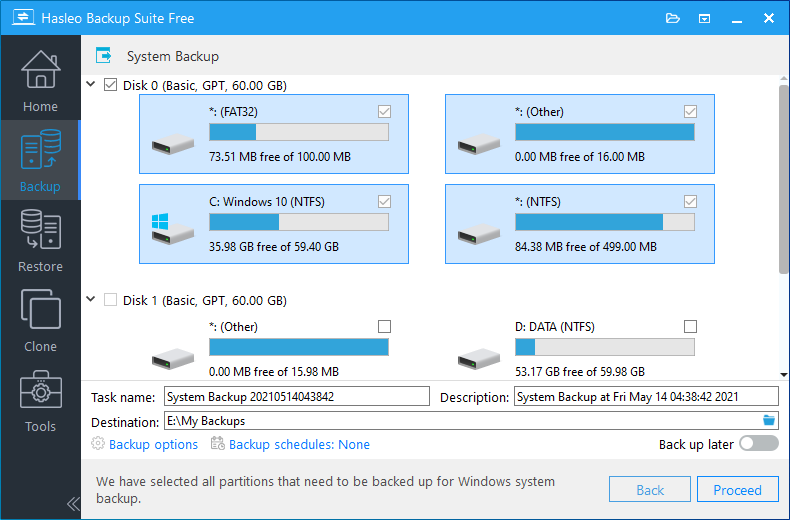
    Back up all partitions related to the normal operation of the Windows operating system, including the system partition, boot partition, and recovery partition, ensures fast system recovery in case of a Windows operating system crash. Hasleo Backup Suite will automatically select all partitions that need to be backed up for Windows operating system backup. Users just needs to modify the task name, description, destination and backup options according as needed. Note: The System Backup feature only backs up the partition where the Windows operating system is located and other partitions related to Windows operating system startup.


    windows-system-backup-select-source.png

  • Disk/Partition Backup

    Back up the entire disk or partition to enable easy file recovery in case of data loss.

    Note: The "Disk/Partition Backup" feature allows you to select multiple disks and partitions for backup, and the data on all selected disks and partitions will be saved to the backup image file, so you can restore data from the disk/partition backup image file when needed.


    windows-system-restore-select-source.png

  • File Backup

    Back up files/folders to enable easy recovery after data loss. The "File Backup" feature allows you to select multiple files(folders) for backup, and all the data of the selected files(folders) will be saved to the backup image file, so you can restore files from the file backup image file after a disaster.

  • System Restore

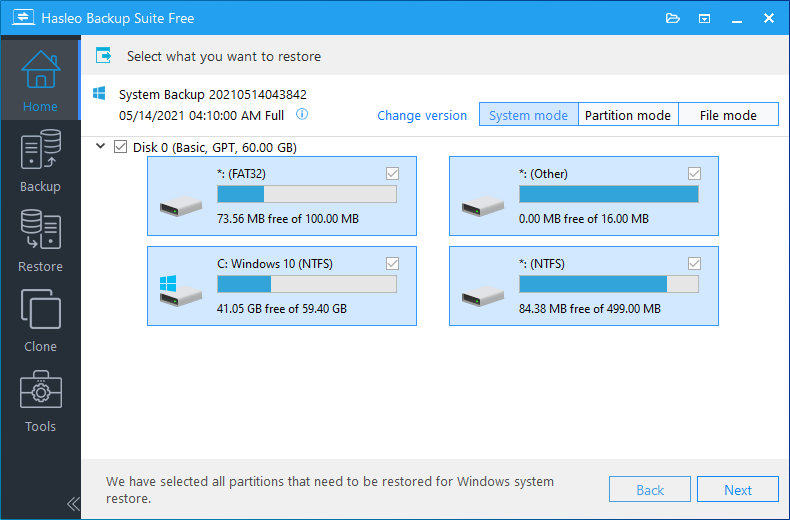
    Choose a System backup task or locate a backup image to restore, select the target backup version. Select the destination disk you want to restore to, then click "Proceed" to start the restore process.

    Note: If you want to restore the entire operating system, please choose "System mode" in the upper right corner. If you only need to restore one of the partitions, please choose "Partition mode". If you only want to restore individual files, please choose "File mode".

  • Disk/Partition Restore

    'Disk/Partition Backup' is usually used to back up data disks or partitions. Select the backup version and target disk/partition, and select a destination disk. Click "Proceed" to start the restoration. You can restore files from the disk partition backup image created before when a data partition is damaged or files are lost due to viruses, power failure, etc.

  • File Restore

    File Backup is used to back up specified files(folders) so that data can be quickly restored from the backup image after a disaster.

  • System Clone

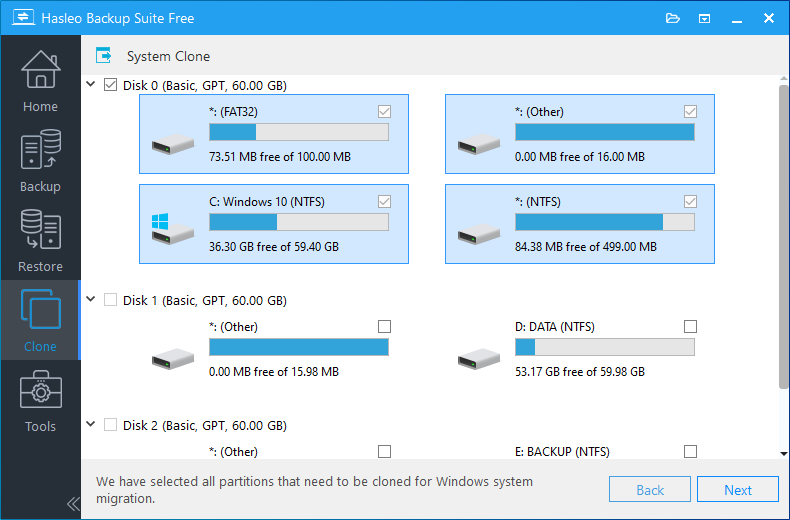
    Easily migrate Windows to another disk or computer without reinstalling the OS, applications and drivers. System clone can easily migrate the Windows operating system from one disk to another, which is very useful for replacing the disk where Windows is currently running with a larger capacity disk or SSD, so that you do not need to reinstall Windows, drivers, and applications, and it can be used for
    Zaloguj lub Zarejestruj się aby zobaczyć!
    purposes.


    windows-system-clone-select-source.png

  • Disk Clone

    Disk clone completely copies the contents of one disk to another disk, including the partition structure and the files in the partitions. It is mainly used to upgrade or replace a disk, such as replacing a mechanical hard disk with an SSD or upgrading a small capacity disk to a large capacity disk. Of course, it can also be used for disk backup purposes. In addition, the Disk clone feature allows you to clone an MBR disk into a GPT disk or vice versa.

  • Partition Clone

    Partition clone copies the specified partition to an existing partition or unallocated space on the current disk or other disks, it generates a partition with the same content as the source partition, so it can be used for
    Zaloguj lub Zarejestruj się aby zobaczyć!
    purposes. As a backup, clone a partition completely to a target location on the current or another disk.


ygjfJGL.jpeg


Latest version is Hasleo Backup Suite version 5.5.2.2 (12/5/2025)

Change Log

  • Fixed an issue that caused file backup failures
  • Fixed an issue that caused partition cloning to fail in WinPE
  • Delta restore is now enabled by default in WinPE
  • Various minor bug fixes and small feature improvements

Zaloguj lub Zarejestruj się aby zobaczyć!


Zaloguj lub Zarejestruj się aby zobaczyć!


PERTINENT LINKS


Zaloguj lub Zarejestruj się aby zobaczyć!


Zaloguj lub Zarejestruj się aby zobaczyć!


Zaloguj lub Zarejestruj się aby zobaczyć!


Zaloguj lub Zarejestruj się aby zobaczyć!


Zaloguj lub Zarejestruj się aby zobaczyć!


Zaloguj lub Zarejestruj się aby zobaczyć!


Zaloguj lub Zarejestruj się aby zobaczyć!


Zaloguj lub Zarejestruj się aby zobaczyć!


Zaloguj lub Zarejestruj się aby zobaczyć!


Zaloguj lub Zarejestruj się aby zobaczyć!


Zaloguj lub Zarejestruj się aby zobaczyć!


Hasleo Backup Suite Beta 260104


Latest version is Hasleo Backup Suite Beta 260104

BETA Change Log:

  • Improved the performance of checking image files
  • Resolved the performance regression issue compared to V5.4
  • Allows performing integrity checks only on newly generated image file(s) upon backup completion
  • Enhanced backup scheduling by adding an option to perform a full backup after executing a specified number of incremental/differential backups
  • Right-click an image file in File Explorer to mount it or perform a restore
  • Added a simple file explorer and screenshot tool to WinPE
  • Added support for the ISO 8601 date/time format
  • Automatically synchronize date/time format and keyboard layout to WinPE
  • Added Arabic language support
  • Various minor bug fixes and small feature improvements


PERTINENT LINKS


Zaloguj lub Zarejestruj się aby zobaczyć!


Zaloguj lub Zarejestruj się aby zobaczyć!


Zaloguj lub Zarejestruj się aby zobaczyć!


Zaloguj lub Zarejestruj się aby zobaczyć!


Zaloguj lub Zarejestruj się aby zobaczyć!


Zaloguj lub Zarejestruj się aby zobaczyć!


Zaloguj lub Zarejestruj się aby zobaczyć!


Zaloguj lub Zarejestruj się aby zobaczyć!


Zaloguj lub Zarejestruj się aby zobaczyć!


Zaloguj lub Zarejestruj się aby zobaczyć!


Zaloguj lub Zarejestruj się aby zobaczyć!


Data and Info derived from Hasleo Software with permission
 

jasonX

Bardzo aktywny
Dołączył
23 Październik 2015
Posty
163
Reakcje/Polubienia
1066
Hasleo Disk Clone


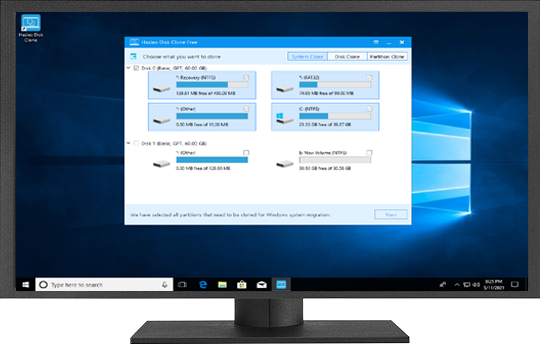
Hasleo Disk Clone is a professional Windows cloning software providing multiple disk alignment modes, sector-by-sector cloning of disks and partitions, flexible partition adjustment (location/size on the destination disk), and MBR/GPT disks conversion during cloning (MBR=>GPT or GPT=>MBR). Additionally, you can create a bootable WinPE emergency disk to migrate disks or partitions.


run-hasleo-disk-clone.png


SzggbH9.jpeg


KEY FEATURES

  • System Clone

    Easily migrate a Windows system (including user settings, drivers, and applications) from one disk to another, without reinstalling and configuring your Windows working environment.


    disk-clone-select-source-disk.png

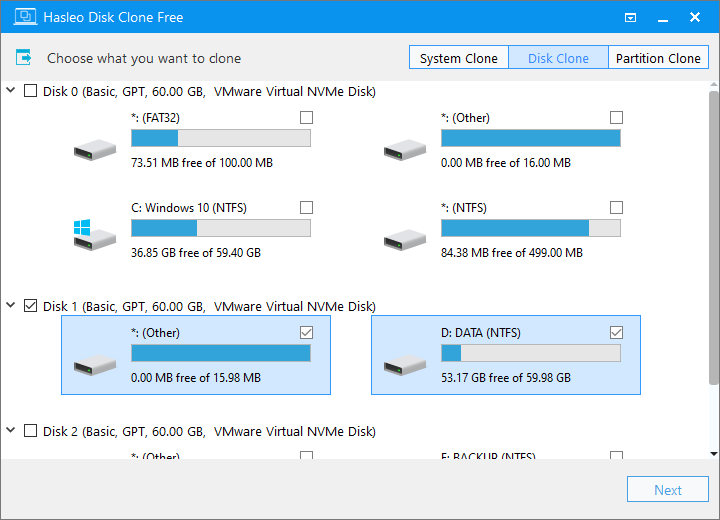
  • Disk Clone

    Disk cloning is the process of creating an exact copy of a source disk to destination disk. The destination disk can be an HDD, SSD, or any other compatible storage medium. This process is typically performed using specialized cloning software. Clone the entire disk to another disk and ensure identical data content on both disks. This is very useful for upgrading to an SSD or a larger capacity disk.


    disk-clone-adjust-size-and-location.png

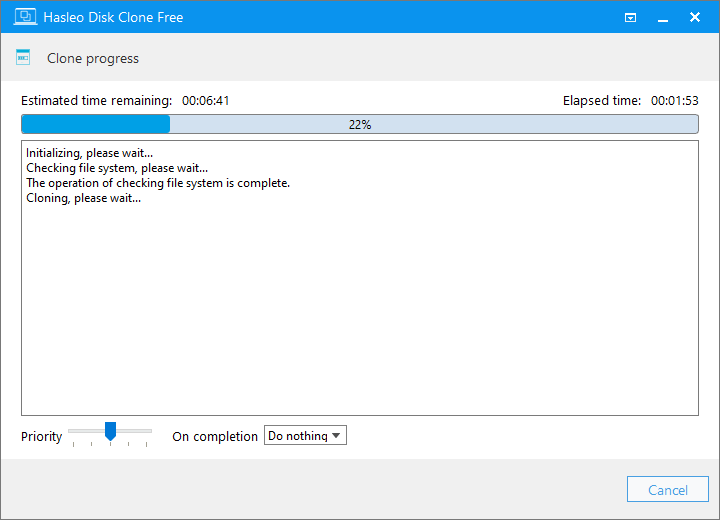
  • Partition Clone

    Clone a partition to another location and keep the data intact. It is very useful to back up the important partition, allowing you to quickly restore the lost files.


    clone-progress.png

  • NEW - Delta Clone

    Delta Clone technology is an efficient solution for data backup and system replication. The purpose of 'Delta Clone' is to clone only the data blocks that have changed relative to a historical benchmark point. Delta Clone's most important technology is rapid and efficient detection of these changed blocks.

  • Convert MBR to GPT/Convert GPT to MBR

    The Master Boot Record (MBR) and GUID Partition Table (GPT) are two differernt disk partitioning schemes. The MBR is the traditional partitioning scheme, supporting disks up to 2TB in capacity and allowing a maximum of four primary partitions. It must be used with the Legacy BIOS boot mode. GPT, the modern standard replacing MBR, supports larger hard drives over 2TB and enables the creation of up to 128 or more partitions. It requires UEFI boot mode.

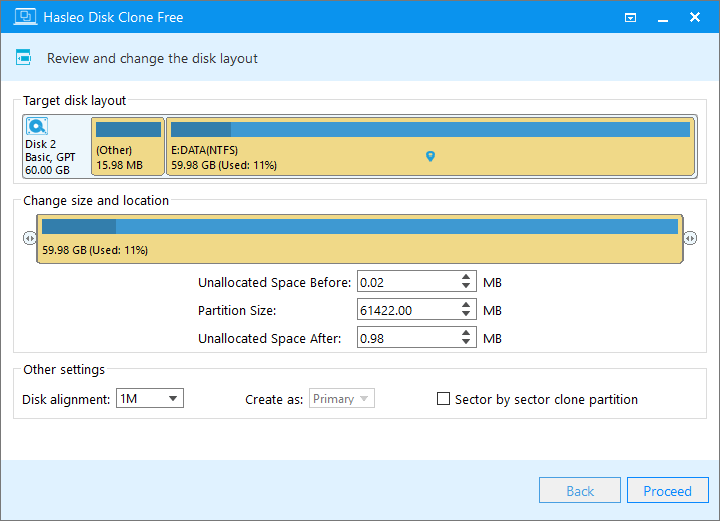
  • Resize and Move Partition

    Before cloning, you can resize and move partitions as needed via the GUI, which is useful when a special disk layout is required. Hasleo Disk Clone allows users to resize and move partitions before cloning. This feature is particularly useful when you need to relocate or resize specific segments of your disk layout.

  • Extremely Fast Cloning Speed

    The deeply optimized file system cloning algorithm can perform cloning operations at an extremely fast speed, ensuring data consistency while significantly reducing processing time.

  • Native support for Windows X86/X64/ARM64

    Native support for Windows X86/X64/ARM64 delivers significantly improved performance, reduced power consumption, and ensures better compatibility and user experience.

  • Bootable WinPE Media

    Hasleo Disk Clone allows for users to create a bootable WinPE media and boot from it to perform cloning operations.


    43K5UR9.jpeg


    Latest version is Hasleo Disk Clone version 5.5.2.2 (11/13/2025)

    Change Log
    • Fixed an issue that caused volume locking failures
    • Fixed an issue with creating WinPE in Windows 7
    • Updated Dutch and Ukrainian translations

    Zaloguj lub Zarejestruj się aby zobaczyć!


    PERTINENT LINKS


    Zaloguj lub Zarejestruj się aby zobaczyć!


    Zaloguj lub Zarejestruj się aby zobaczyć!


    Zaloguj lub Zarejestruj się aby zobaczyć!


    Zaloguj lub Zarejestruj się aby zobaczyć!


    Zaloguj lub Zarejestruj się aby zobaczyć!


    Zaloguj lub Zarejestruj się aby zobaczyć!


    Zaloguj lub Zarejestruj się aby zobaczyć!


    Data and Info derived from Hasleo Software with permission
 
  • Lubię to
Reactions: al

jasonX

Bardzo aktywny
Dołączył
23 Październik 2015
Posty
163
Reakcje/Polubienia
1066
Hasleo EasyUEFI

Hasleo EasyUEFI is a handy and useful software that allows you to manage (U)EFI boot options, BCD boot options and EFI System Partition (ESP), it can help you repair Windows boot issues caused by corrupted or missing (U)EFI boot option, BCD boot option or EFI System Partition.


yEnCgJP.png


Hasleo EasyUEFI supports the creation of WinPE emergency disks, so you can boot from the WinPE emergency disks to fix issues caused by damaged or missing UEFI boot entries, BCD boot entries, or ESP when your Windows fails to boot.

Features at a glance:

  • Manage (U)EFI/BCD Boot Options & EFI System Partitions & Fix (U)EFI/BCD Boot Issues
  • Comprehensive (U)EFI boot option management functions, such as create, delete, edit (U)EFI boot options, change (U)EFI boot sequence, etc.
  • New - Comprehensive BCD boot option management functions, such as create, delete, edit BCD boot options, change default boot entry, etc.
  • Backup, restore, rebuild, delete, explore, read and write EFI System Partition (ESP) or move EFI System Partition (ESP) to another drive.
  • Creation of Windows PE emergency disk and command line support
  • Supported OS: (U)EFI-based Windows 11/10/8/7/Vista/2022/2019/2016/2012/2008.


AVt8eDm.png


Hasleo EasyUEFI v6.0 (6/5/2025)

Change Log - Version 6.0 (6/5/2025)

  • Added feature to manage BCD boot options
  • Fix other minor bugs

Zaloguj lub Zarejestruj się aby zobaczyć!


PERTINENT LINKS


Zaloguj lub Zarejestruj się aby zobaczyć!


Zaloguj lub Zarejestruj się aby zobaczyć!


Zaloguj lub Zarejestruj się aby zobaczyć!


Zaloguj lub Zarejestruj się aby zobaczyć!


Zaloguj lub Zarejestruj się aby zobaczyć!


Zaloguj lub Zarejestruj się aby zobaczyć!


Zaloguj lub Zarejestruj się aby zobaczyć!


Zaloguj lub Zarejestruj się aby zobaczyć!


Zaloguj lub Zarejestruj się aby zobaczyć!


Zaloguj lub Zarejestruj się aby zobaczyć!


Data and Info derived from Hasleo Software with permission
 
  • Lubię to
Reactions: al

jasonX

Bardzo aktywny
Dołączył
23 Październik 2015
Posty
163
Reakcje/Polubienia
1066
Hasleo Data Recovery For Windows


Hasleo Data Recovery For Windows : Powerful Data Recovery Software to Recover Deleted/Lost Files from All Data Loss Situations!

Hasleo Data Recovery is an all-in-one data recovery software that allows you to retrieve lost files from any kind of storage device like computer's hard drive, external hard drive, USB flash drive, camera, mobile phone, MP3 & MP4 player, and etc, even if the storage device is encrypted with BitLocker Drive Encryption. With this software, you can get back all lost files in just a few simple steps, as long as the lost data haven’t been overwritten by new files.


0cF9TEc.png


As a professional Data Recovery Software for Windows 11/10/8/7/XP and Windows Server, Hasleo Data Recovery can help you recover deleted or lost files from hard disk, SSD, external hard drive, USB flash drive, SD card and other storage devices easily and quickly, it supports all data loss scenarios, such as accidental file deletion, files gone from drive, mistaken drive deletion, virus attack, hard drive failures, drive reformatted/inaccessible, drive damaged/corrupted, etc. And you can recover all your lost files from Windows BitLocker encrypted drive with the Ultimate/Technician edition.


Gm3SKOW.png


Features at a glance:

  • Recover data from deleting, formatting, partition loss, OS crash, virus attack and other data loss cases.
  • Recover documents, emails, photos, videos, audio files and more.
  • Recover data from hard drive, USB drive, SD card and other storage media.
  • Recover data from BitLocker encrypted drive.Improved
  • Creation of WinPE bootable media for emergency data recovery.
  • Recovers data from FAT, NTFS, exFAT and HFS+ drive.
  • Supported OS: Windows XP/Server 2003 or later, fully compatible with GPT and UEFI.


Deleted File Recovery
Quickly recover accidentally deleted files, like emptied from Recycle Bin or deleted by using SHIFT+DELETE key, etc.

Zaloguj lub Zarejestruj się aby zobaczyć!


Deep Scan Recovery

Recover lost files from all data loss situations, such as deleted, corrupted or formatted partitions or RAW drives, etc.

Zaloguj lub Zarejestruj się aby zobaczyć!


BitLocker Data Recovery

Recover files from healthy, inaccessible, formatted, deleted, damaged, corrupted or lost BitLocker encrypted drives.

Zaloguj lub Zarejestruj się aby zobaczyć!


cJPUvoV.png


Hasleo Data Recovery For Windows Version 10.2 (11/10/2025)[/

Change Logs - Version 10.2 (11/10/2025)

  • Fixed an issue that could cause cloned Windows to fail to start properly
  • Added support for dynamically expanding virtual disks (VHD/VHDX)
  • Fix other minor bugs

Zaloguj lub Zarejestruj się aby zobaczyć!


PERTINENT LINKS


Zaloguj lub Zarejestruj się aby zobaczyć!


Zaloguj lub Zarejestruj się aby zobaczyć!


Zaloguj lub Zarejestruj się aby zobaczyć!


Zaloguj lub Zarejestruj się aby zobaczyć!


Zaloguj lub Zarejestruj się aby zobaczyć!


Zaloguj lub Zarejestruj się aby zobaczyć!


Zaloguj lub Zarejestruj się aby zobaczyć!


Zaloguj lub Zarejestruj się aby zobaczyć!


Zaloguj lub Zarejestruj się aby zobaczyć!


Zaloguj lub Zarejestruj się aby zobaczyć!


Data and Info derived from Hasleo Software with permission
 
Do góry